
Pagination is a common requirement in APIs, dashboards, admin panels, and any application that works with large datasets. The two most common approaches are OFFSET pagination and last ID pagination — also known as keyset pagination or cursor pagination. Both work well on small datasets, but they behave very differently as a table grows. If performance, scalability, and data consistency matter, last ID pagination is usually the safer choice.
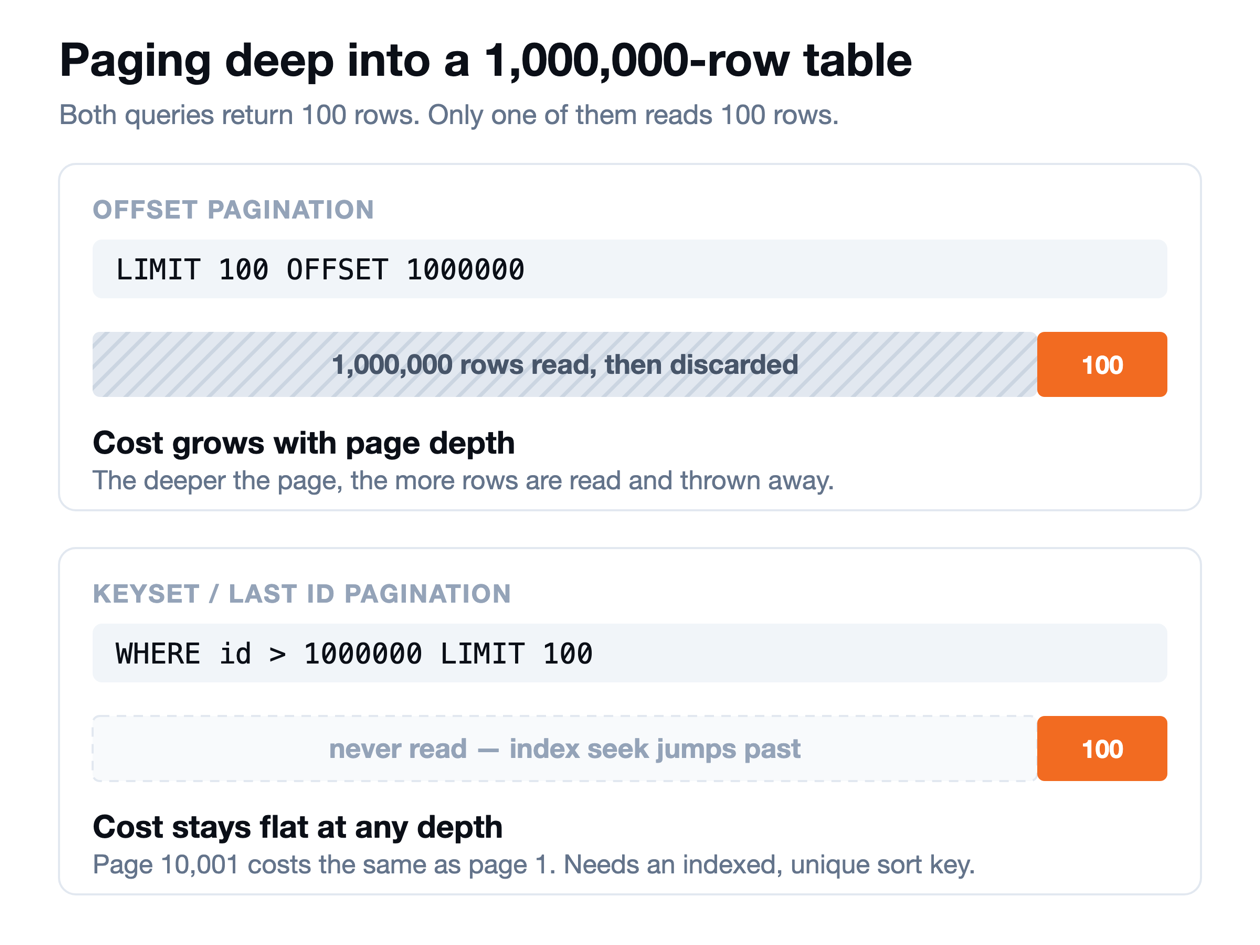
What is OFFSET pagination?
OFFSET pagination uses LIMIT and OFFSET to skip a number of rows before returning the requested result:
SELECT *
FROM orders
ORDER BY id
LIMIT 100 OFFSET 1000000;
The important point is that LIMIT 100 does not mean the database only touches 100 rows. With a large offset, the engine may still need to walk through a large portion of the ordered result set before it can return the final 100 records — which is why OFFSET pagination tends to get slower the deeper a user pages into a table.
What is last ID pagination?
Last ID pagination uses the last record returned from the previous query as the starting point for the next one:
SELECT *
FROM orders
WHERE id > :lastId
ORDER BY id
LIMIT 100;
If the previous request ended at lastId = 1000000, the next query becomes:
SELECT *
FROM orders
WHERE id > 1000000
ORDER BY id
LIMIT 100;
With an index on id, the database can seek directly to that point and continue forward — instead of asking it to skip everything already processed, the application simply tells it where to continue.
OFFSET vs last ID pagination compared
| Feature | OFFSET pagination | Last ID / keyset pagination |
|---|---|---|
| Query style | LIMIT 100 OFFSET 1000000 | WHERE id > lastId LIMIT 100 |
| Implementation | Very simple | Slightly more complex |
| Small datasets | Excellent | Excellent |
| Large datasets | Can become slow | Excellent |
| Deep pagination | Expensive | Efficient |
| Index usage | Less efficient at large offsets | Very efficient |
| Numbered pages | Easy | Difficult |
| Jump directly to page 100 | Easy | Difficult |
| Concurrent inserts/deletes | Can shift results | More stable |
| Infinite scrolling | Good | Excellent |
| REST / API pagination | Good | Excellent |
| ETL and batch processing | Not ideal | Excellent |
| High-frequency tables | Riskier | Safer |
Why OFFSET pagination gets slower
Consider this query against a large transactions table:
SELECT *
FROM transactions
ORDER BY id
LIMIT 100 OFFSET 5000000;
The application only needs 100 rows, but the database may still have to process and discard the 5,000,000 rows ahead of them before it can return the next 100. As the offset climbs — from 100, to 10,000, to 1,000,000, to 10,000,000 — the query can become progressively more expensive. That's a real problem for large transaction tables, logs, audit history, event streams, or any table with millions of rows.
Why last ID pagination performs better
Compare it with:
SELECT *
FROM transactions
WHERE id > 89234521
ORDER BY id
LIMIT 100;
If id is indexed, the database can locate the starting point directly in the index and read forward from there, without repeatedly skipping millions of earlier records. That makes keyset pagination far more predictable as a dataset grows — the cost of fetching page 2 and page 200,000 is essentially the same.
Last ID pagination is also safer for changing data
Performance isn't the only difference — OFFSET pagination is based on position. If the first page returns rows 101–103 and the next request uses OFFSET 3, but another transaction inserts or deletes rows near the start of the result set in between, the row positions shift. OFFSET pagination can then return the same row twice, skip a row, or produce inconsistent page boundaries.
Last ID pagination doesn't depend on position. The application remembers lastId = 103 and asks:
SELECT *
FROM records
WHERE id > 103
ORDER BY id
LIMIT 100;
In effect, it's saying: "I have already processed everything through ID 103 — continue from there." That makes it especially well suited to tables receiving frequent inserts and deletes.
When OFFSET pagination is still a good choice
OFFSET isn't bad — for small datasets and traditional numbered-page navigation, it's often the simplest solution, and it makes jumping directly to an arbitrary page (LIMIT 50 OFFSET 200) trivial. It's usually fine for small admin tables, search results with limited depth, reporting screens, and any UI where users expect numbered pages. The problem is reaching for OFFSET everywhere without considering how large the table might eventually get.
When to use last ID pagination
Keyset pagination is usually the better default for large databases, transaction history, activity feeds, event logs, audit tables, REST and GraphQL APIs, infinite scrolling, background processing, and ETL pipelines. A typical API response might look like:
{
  "data": [],
  "nextCursor": 89234621
}
and the next request simply sends ?lastId=89234621&limit=100. This scales naturally without ever requiring an increasingly large offset.
One important rule: the cursor must match the sort order
Using only lastId works well when the query is ordered by id. But many applications sort by time instead:
ORDER BY created_at DESCIn that case, a timestamp alone usually isn't safe, because multiple rows can share the same value. A composite cursor is the more reliable approach:
ORDER BY created_at DESC, id DESCSELECT *
FROM events
WHERE created_at < :lastCreatedAt
OR (created_at = :lastCreatedAt AND id < :lastId)
ORDER BY created_at DESC, id DESC
LIMIT 100;The general rule: a pagination cursor should follow a unique, deterministic sort order — if the columns you're paginating on can tie, add a tiebreaker column to the cursor and the ORDER BY alike.
Final recommendation
The difference comes down to one idea: OFFSET pagination skips everything before the page; last ID pagination continues from where it stopped. For a small dataset, OFFSET is simple and practical. For a large or frequently changing table, last ID / keyset pagination is usually faster, more scalable, and more consistent. Don't make the database repeatedly find and discard rows it has already processed — give it a key and tell it where to continue. That one change in pagination strategy can matter a great deal once a table grows from thousands of rows to millions.
Getting pagination right often starts with understanding the shape of the table you're paginating — its indexes, keys, and how it differs across environments. If you're comparing schemas across dialects or checking that an index your pagination strategy depends on actually made it to production, see how to compare two database schemas and generate migration SQL, or run ad-hoc pagination queries directly against your database in the SQL Editor docs. FoxSchema is free and self-hostable in Docker if you want to try it against your own tables.
