
Archive a large table without changing what your application sees: FoxSchema's Clone Table renames the table to name_1 (or the next free name_N) and recreates an empty table with the original name and columns, so queries and jobs keep working. You read the exact SQL before anything runs.
The problem with archiving by hand
Logs, events and audit trails grow until every query, backup and index rebuild pays for rows nobody reads. The classic fix is to move the old data aside and start fresh. Done manually that means renaming the table, writing a CREATE TABLE that matches the original, and remembering every index and foreign key. Miss one and the new table quietly behaves differently from the old one.
What Clone Table does
- Archives the original as
name_1, the next freename_N, or from a starting number you choose. - Recreates an empty table with the original name and columns, so anything that uses the name keeps working.
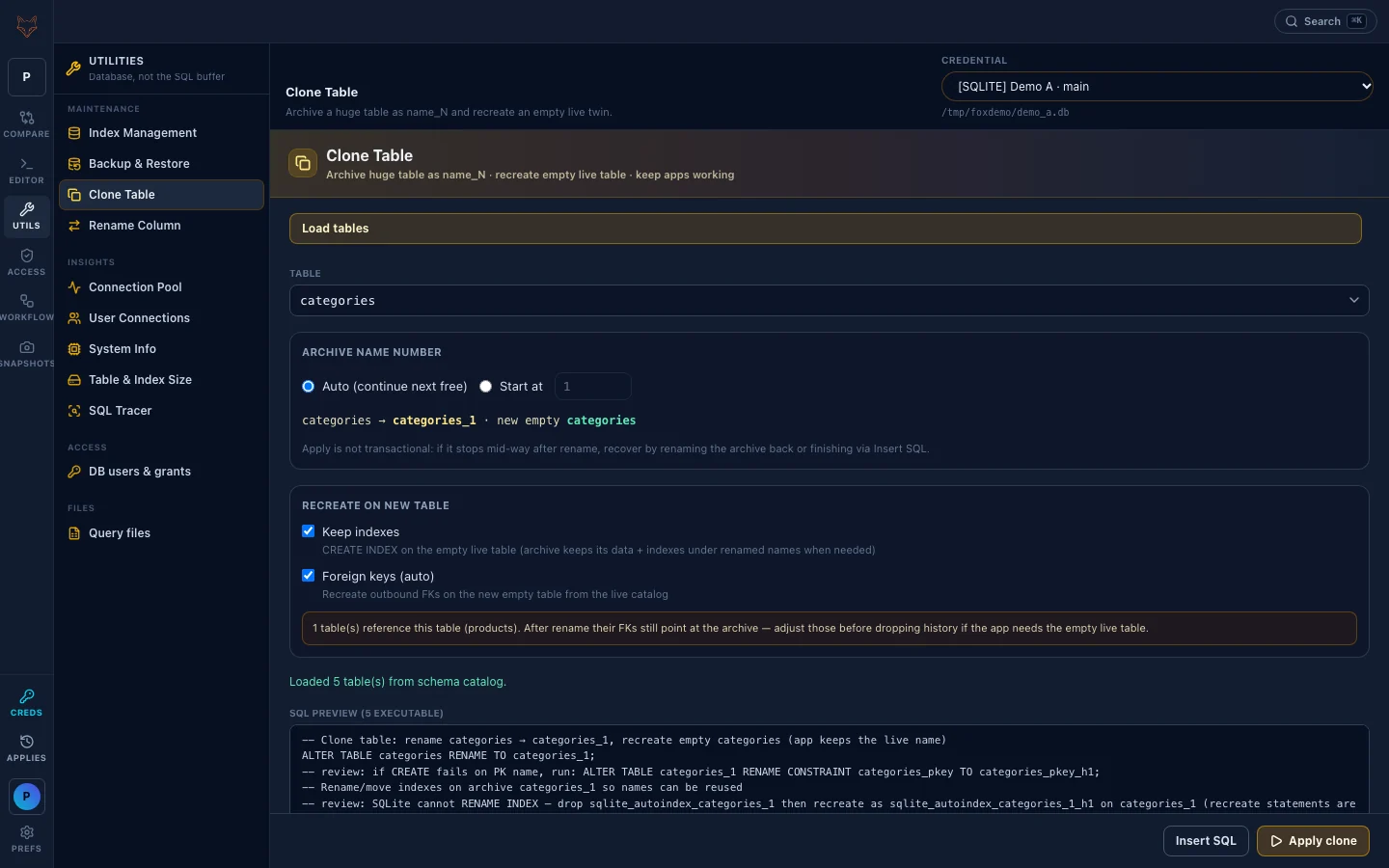
- Keep indexes and Foreign keys (auto) recreate the table's indexes and its outbound foreign keys on the new table, read from the live catalog.
- Insert SQL drops the script into the SQL Editor for review; Apply clone runs it.
For a table called orders, the preview starts by moving it to orders_1, then creates a new empty orders with the same columns, then recreates the indexes and foreign keys you ticked.
How to archive a large table with Clone Table
- Open Utils → Clone Table and pick a saved connection.
- Click Load tables and choose the table to archive.
- Pick the archive number: Auto (continue next free) or Start at a number.
- Decide whether the new table keeps its indexes and foreign keys.
- Read the SQL preview, then use Insert SQL to review it in the editor or Apply clone to run it.
Read the notes before you apply
Clone Table is candid about its limits, and you should read them:
- Apply is not one transaction. It stops at the first failed statement. If it stops after the rename, rename the archive back or finish the remaining steps with Insert SQL.
- Foreign keys from other tables keep pointing at the archive. Tables that reference the original still point at the renamed copy until you update them, and the screen tells you how many tables do.
- Read the comments in the preview. The SQL is written for the engine of the connection you picked, and lines marked
reviewflag spots that need a human look.
When to archive a large table this way
Clone Table suits append-mostly tables where history can live in an archive: logs, events, sessions, audit rows. If you want to change a column instead, use Rename Column, and for big in-place alterations see our guide to large-table ALTER strategies. Before archiving, also check whether the size comes from indexes nobody uses: finding unused indexes may buy you more than an archive.
Habits that keep it safe
- Run it on staging first and read the preview line by line.
- Pick a quiet window: the rename and the re-create are separate steps, so writes that arrive between them have no table to land in.
- Keep the archive until you have updated referencing foreign keys and checked the new table.
Clone Table is one of several maintenance tools under Utils; the Feature Guide covers them all. Install FoxSchema or self-host it with Docker to try it on your own databases.
Further reading: for more on archive a large table, see the PostgreSQL table partitioning guide.
