
The SQL Editor's JavaScript code cells let you clean, reshape, and validate query results without leaving the browser tab or standing up a separate script. Instead of exporting a CSV to hand-edit in a spreadsheet, or writing a one-off Node script just to fix casing and date formats before a migration, you fence a JS transform directly under the SQL that produced the rows — SQL and code in the same buffer, one Run.
What a code cell is
A code cell is a fenced block inside the same SQL Editor tab as your queries. Fence one with -- @js / -- @ts … -- @end to run it in your browser, or -- @node / -- @nodets … -- @end to run it on the FoxSchema server. Inside the fence you get ordinary JavaScript: let/const, functions, loops, async/await, and fetch. Imports are allowlisted and bundled — no CDN — to lodash, lodash-es, and date-fns. Python isn't available.
Each cell receives two things: last, the previous statement's result grid, and vars, your session Variables (including secrets). A cell must return either { columns, rows } or an array of plain objects, which then renders as its own result table right below the SQL it followed.
Why this matters for migrations
Legacy data is rarely clean. A column exported from an old system might mix 'jane smith', 'MIKE ross', and 'John Doe' in the same table, or store dates as whatever string format the original application happened to write. A schema diff gets your target table structure right, but it says nothing about whether the data landing in it is consistent. Normalizing that data is exactly the kind of throwaway transform a code cell is built for — small enough that a standalone script feels like overkill, but fiddly enough that hand-editing rows is a mistake waiting to happen.
A worked example
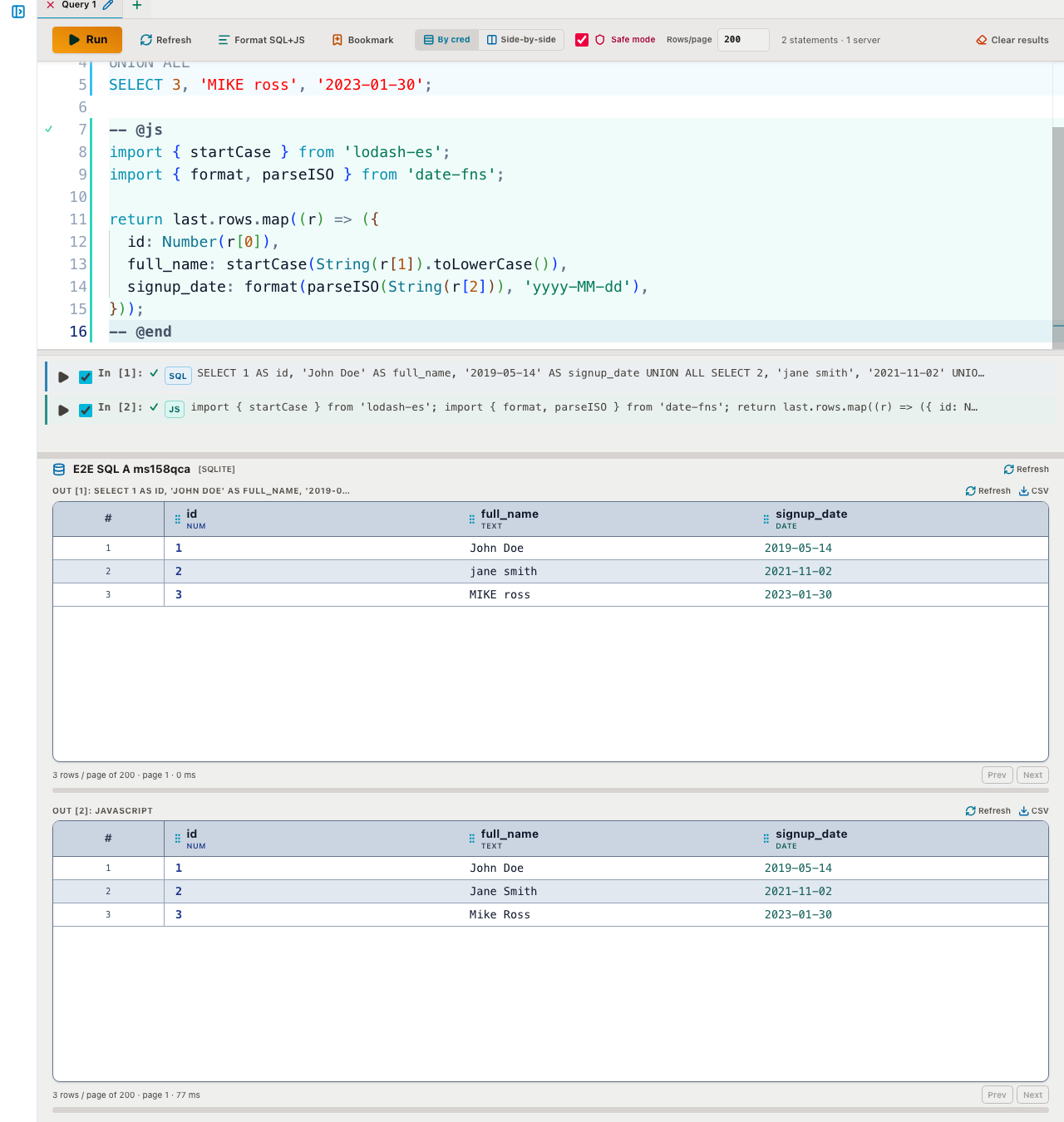
Run a query returning the raw legacy rows, then fence a JS cell underneath that reads last.rows and returns a cleaned-up version:
SELECT id, full_name, signup_date FROM legacy_customers;

-- @js
import { startCase } from 'lodash-es';
import { format, parseISO } from 'date-fns';

return last.rows.map((r) => ({
  id: Number(r[0]),
  full_name: startCase(String(r[1]).toLowerCase()),
  signup_date: format(parseISO(String(r[2])), 'yyyy-MM-dd'),
}));
-- @end
Running both statements together shows the two result grids stacked: the messy source rows from the SQL statement, and the normalized output from the JS cell directly beneath it — startCase turns 'MIKE ross' into Mike Ross, and parseISO + format collapses whatever date format the source used into a consistent yyyy-MM-dd.
Writing the cleaned data back
A browser -- @js cell is read-only by design — it can reshape data for review, but it can't write to a database itself. To land normalized rows in a target table, use a -- @node cell instead. Node cells get a sql tagged template bound to the run's credential, where interpolated values become bind parameters rather than raw SQL text:
-- @node
const rows = last.rows.map((r) => ({
  id: Number(r[0]),
  full_name: r[1],
  signup_date: r[2],
}));
await sql`INSERT INTO ${sql.id('customers')} ${sql.values(rows)}`;
-- @end
sql.values(rows) expands to a parameterized multi-row insert, and sql.id() quotes an identifier — neither ever puts a raw value into the SQL string. If Safe mode is on, that write is rejected server-side until you confirm it, the same protection that applies to any other write or DDL statement in the editor.
Browser cells vs. Node cells
The two cell types trade off differently. Browser cells (-- @js / -- @ts) run in your own tab and carry no special risk beyond the page itself. Node cells (-- @node / -- @nodets) execute in a worker thread on the FoxSchema server with a scrubbed environment and a hard timeout — a guardrail against accidents, not a hard security boundary, since a determined cell can still reach the network or burn CPU. On a personal install that's the point: it's your server. If you're self-hosting FoxSchema for multiple people, treat the ability to run Node cells as equivalent to shell access on that host, and scope it accordingly.
Get started
The SQL Editor ships with sample scripts under Bookmarks → Add samples, covering lodash transforms, async fetch, and parameterized writes. Read the full reference in the docs, or try it against your own databases by self-hosting the Docker container.
